Quick summary: Getting connected in Korea usually comes down to three real choices — a physical prepaid SIM, an eSIM, or a rental pocket WiFi — and the right one depends less on “which is best” and more on your phone model, your trip length, and how much you’d rather not deal with an airport counter line after a 12-hour flight. This guide walks through each option with honest trade-offs, a step-by-step eSIM setup checklist, and the mistakes that trip up most first-time visitors buying a Korea SIM card.

Do you actually need a SIM card in Korea?
Yes, almost certainly — even if your hotel has great WiFi. The moment you land at Incheon and try to figure out which train to take into Seoul, you’ll want data, not just because it’s convenient but because Korea’s digital infrastructure genuinely assumes you have it. Google Maps, for instance, can’t give you driving or transit directions inside Korea (a long-standing government mapping restriction), and even walking directions are unreliable, so everyone defaults to Naver Map or Kakao Map instead. Add in Kakao T for taxis, restaurant reservation apps that don’t have English phone lines, and subway apps that update platform changes in real time, and you start to see why offline sightseeing in Korea gets frustrating fast.
The real question isn’t whether you need data — it’s which format fits your device and how long you’re staying. That’s what the rest of this guide sorts out.
What are your main options for a Korea SIM card?
Four things get lumped together under “Korea SIM card” even though only one of them is technically a SIM:
- Physical prepaid SIM card — a small chip you swap into your phone, replacing (or sharing a dual-SIM slot with) your home SIM
- eSIM — a digital SIM profile installed via QR code, no physical card, no tray to fumble with on a plane
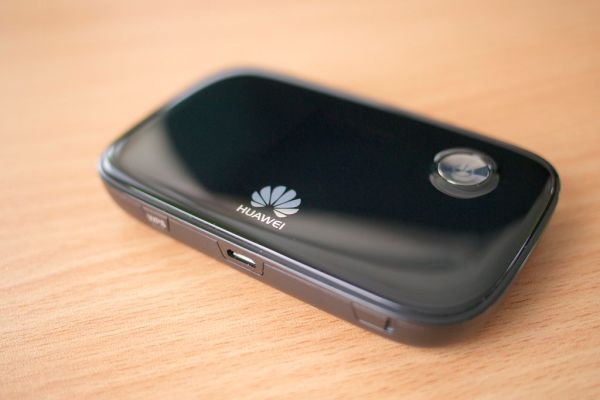
- Pocket WiFi (WiFi egg) — a small rechargeable router you carry in your bag that beams WiFi to your phone, tablet, and your travel companions’ devices too
- Roaming through your home carrier — using your existing plan’s international add-on, which is convenient but usually the priciest per day by a wide margin
For most short-term visitors it really narrows down to prepaid SIM vs. eSIM vs. pocket WiFi. Roaming only makes sense if your home carrier happens to run an unusually generous Korea-specific package — worth a quick check, but don’t count on it.

Prepaid SIM vs. eSIM vs. pocket WiFi: which one fits you?
Here’s how these three actually behave day to day, not just how they look on a comparison chart:
Prepaid physical SIM card
- Best for: travelers with an unlocked phone who want a dead-simple, single-device setup and don’t mind losing their home number for a few days
- Downside: your home SIM gets bumped out (unless you have a dual-SIM phone), so calls and texts to your regular number won’t reach you, and you’ll need a SIM ejector tool — or a bent paperclip, which every hotel front desk seems to have one of
- Pickup: counters at Incheon and Gimpo airports, or convenience stores and telecom shops around the city
eSIM
- Best for: anyone with a reasonably recent phone (most iPhones from the XS onward, many recent Samsung and Google Pixel models) who wants to keep their home number live for calls and texts while running Korean data on a second line
- Downside: it needs to be installed while you have WiFi, so squeezing it in mid-flight isn’t an option — do it the night before, not while boarding
- Pickup: nothing physical at all — buy online, get a QR code by email, scan it, done
Pocket WiFi (WiFi egg)
- Best for: families or groups splitting one connection across several phones, or anyone with an older phone that can’t easily take a foreign SIM
- Downside: it’s one more device to charge and keep track of, everyone needs to stay within roughly a room’s distance of it for signal, and heavy use (constant navigation plus video calls) can drain the battery well before dinner
- Pickup: reserved online ahead of time, picked up and returned at airport counters — losing track of it is the one real risk
If you’re traveling solo with a modern smartphone, eSIM is usually the path of least resistance. If you’re a family of four trying to avoid buying four separate data plans, a single pocket WiFi often ends up cheaper and simpler, even though it means everyone has to stick roughly together.
Where should you buy your Korea SIM card or eSIM?
You’ve realistically got three windows to buy: before you leave home, right at the airport when you land, or after you’re already settled in the city.
Buying before departure
This is how most people handle eSIMs. You buy through a provider’s site or app, get a QR code by email, and can install the profile whenever you next have WiFi — sometimes days ahead of your flight. Most plans only start counting down once the eSIM detects it’s on a Korean network, so installing early doesn’t burn through your data days for nothing.
Buying at Incheon or Gimpo Airport
Telecom counters — KT, SK Telecom, LG U+, and a handful of resellers — sit right in the arrivals hall, which is handy if you didn’t plan ahead. The catch: counter prices usually run a bit higher than the same plan booked online, and if you land during a busy stretch when several long-haul flights arrive close together, the line can eat 20–30 minutes you’d rather spend getting to your hotel.
Buying in the city
Some convenience stores in tourist-heavy neighborhoods carry short-term prepaid SIMs, and telecom shops near university areas or major stations can set you up too. This is fine if you have some way to get online for your first few hours (hotel WiFi covers it), but not great if you need maps the second you step off the plane.
Practical tip: pre-booking an eSIM or airport SIM pickup online is almost always cheaper than paying at the counter, and it guarantees the specific plan you wanted hasn’t sold out.
How do you set up an eSIM step by step?
If this is your first eSIM, here’s the general flow (exact menu names shift slightly by phone model):
- Check compatibility — confirm your phone supports eSIM and is carrier-unlocked; this is the step people skip and regret
- Buy the plan — pick a data amount and trip length from the provider’s site or app
- Receive your QR code — usually lands in your inbox within minutes, occasionally a few hours
- Connect to WiFi — home, a cafe, airport WiFi, anywhere — before you try to install anything
- Install the profile — on iPhone it’s typically Settings → Cellular → Add eSIM; on Samsung it’s Settings → Connections → SIM Manager; either way, you’ll scan the QR code
- Set your default lines — keep your home SIM as default for calls/texts and the new eSIM as default for data/roaming, so you don’t accidentally rack up home-carrier roaming charges
- Turn on data roaming for that eSIM line specifically — this is the step that trips up the most first-timers; the eSIM can be perfectly installed and still not work until roaming is switched on for it
- Land and test it — toggle airplane mode on and back off once you touch down, which forces your phone to search fresh for the Korean network
The most common support request isn’t a broken eSIM — it’s someone who forgot step 7 and assumed their new SIM was faulty.

What data amount and plan length do you actually need?
Plans are typically sold in day-based bundles — anywhere from a few days to a month or more — with either unlimited data that slows down after a certain cap, or a fixed high-speed allowance. A few things worth thinking through before you pick a number:
- Heavy navigation plus video (Naver Map running constantly, uploading photos and video to Instagram or TikTok as you go): lean toward unlimited or a generous-cap plan rather than the cheapest tier
- Mostly messaging, maps, and light browsing: a mid-tier daily allowance covers this comfortably for most people
- Trip length matters more than people expect — cutting it one day short means scrambling for a top-up mid-trip, while overbuying just wastes money since unused days generally aren’t refunded
When in doubt, round up by a day rather than cutting it close — especially if your return flight has a long layover where you’ll still want maps and messaging working.
What should you watch out for when buying a Korea SIM or eSIM?
- Phone compatibility — not every phone sold outside Korea supports eSIM, and some carrier-locked phones (common with certain budget or installment-plan phones in the US) can’t accept a foreign SIM of any kind — check this before you fly, not at the airport counter
- Calls and texts — most tourist SIM and eSIM plans are data-only, no Korean phone number attached; if you need to call a restaurant or a taxi company directly, look for a plan with voice minutes included, or plan to lean on KakaoTalk instead
- Physical SIM tray size — nano vs. micro varies by phone model; airport counters usually stock both, but if you’re buying online for pickup, double-check your phone’s spec before you order
- Coverage outside major cities — signal is excellent in Seoul, Busan, and other big cities, but can thin out in mountainous national parks or remote coastal stretches, so don’t count on flawless streaming everywhere
- Pocket WiFi return policy — these devices need to go back to the airport counter before you fly home; returning late or losing one usually triggers a fee, so leave a buffer before your flight rather than sprinting for the counter

Which option should you actually choose?
A quick way to decide based on your actual trip, not a generic ranking:
- Solo traveler, modern smartphone, short trip: eSIM bought online ahead of time — least hassle, and your home number stays reachable
- Solo traveler, older phone or unsure about eSIM support: physical prepaid SIM, picked up at the airport or reserved online in advance
- Family or group with several devices: pocket WiFi, so you’re managing one connection and one bill instead of four
- Business traveler who needs their home number reachable at all times: eSIM for data, home SIM left active for calls, or check whether your carrier has a decent Korea add-on
- Very short layover or day trip: free airport WiFi plus a short eSIM day-pass, rather than committing to a longer plan you’ll barely touch
Whichever you pick, the underlying networks — KT, SK Telecom, LG U+ — are all reliably strong nationwide, so choosing the cheaper option isn’t a coverage compromise. The real differences come down to convenience, whether your device plays nicely with eSIM, and how many people need to share the connection.
자주 묻는 질문 (FAQ)
Can I use my home country’s SIM card in Korea with roaming?
Yes, if your carrier offers international roaming in Korea — but it’s usually the most expensive per-day option compared to a local prepaid SIM or eSIM. Check your carrier’s Korea-specific roaming rate before leaning on it for a longer trip.
Do I need an unlocked phone to use a Korea SIM card?
Yes. Your phone has to be carrier-unlocked to accept either a physical Korean SIM or a Korean eSIM. Phones bought outright are usually already unlocked, but phones still tied to an installment plan or contract back home sometimes aren’t — worth confirming with your carrier before you pack.
Is it cheaper to buy a SIM card online in advance or at the airport in Korea?
Buying online in advance is almost always cheaper and guarantees the plan is actually available when you land. Counter prices at Incheon or Gimpo tend to run higher, and lines can stretch out right after big international flights arrive.
Will I get a Korean phone number with a tourist SIM or eSIM?
Usually not. Most tourist-focused SIM and eSIM plans are data-only, without a full Korean number for calls and texts. If you need to make local calls, look specifically for a plan that includes voice minutes, or rely on messaging apps like KakaoTalk over data instead.
What happens if I run out of data before my trip ends?
Most providers let you top up or extend your plan through their app or website without reinstalling anything. It’s worth checking your provider’s top-up process before you leave home, so you’re not stuck offline mid-trip if you underestimated how much data you’d actually use.